famstack started with one wish: keep what our kids say while they are small.
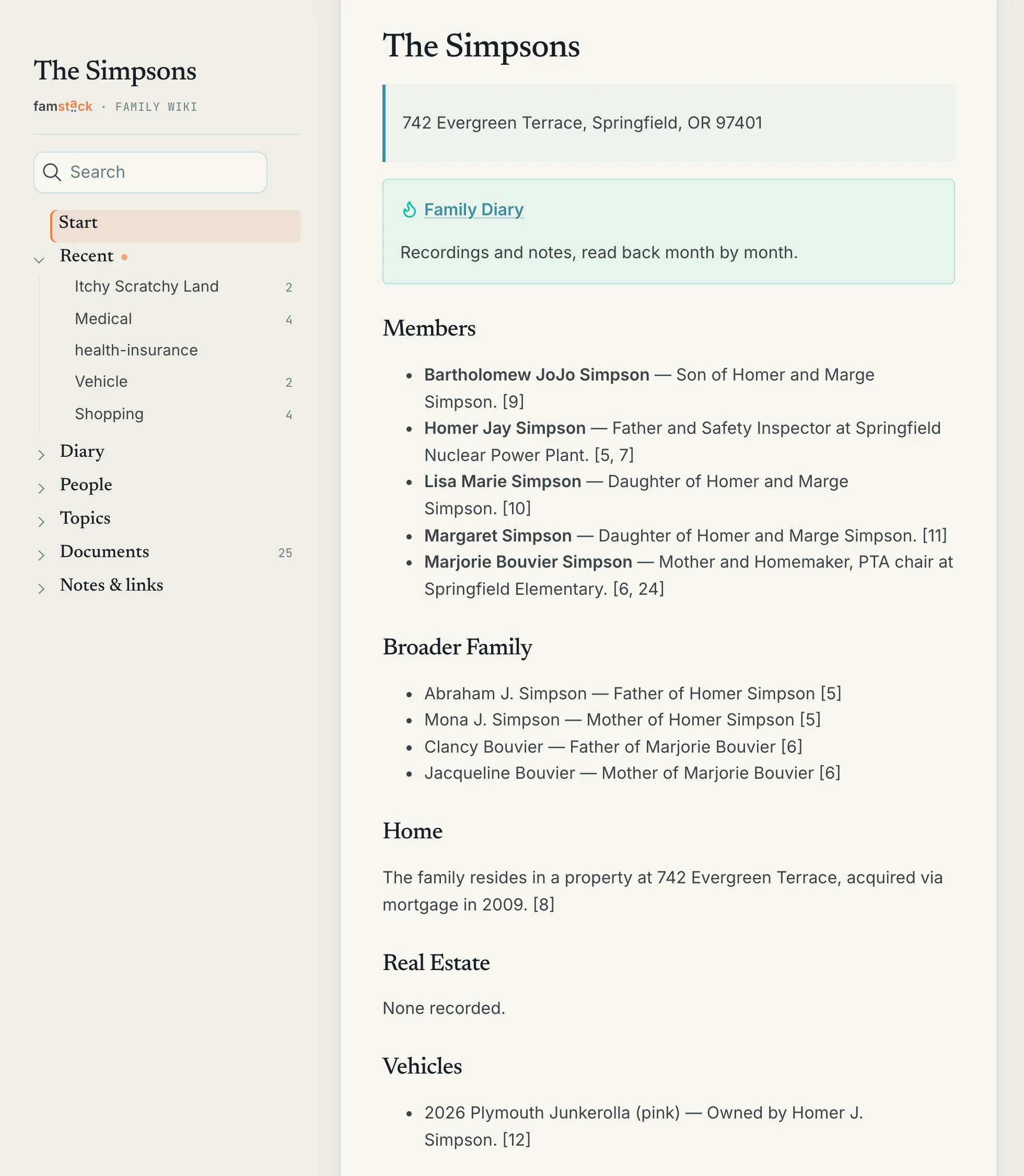
Once or twice a week, usually at the dinner table, we record a short voice message about what the kids said, and I wanted those recordings somewhere they would still be when the kids are grown up, on our own Mac, readable and findable. The memories room was in the plan from the first day, before the document archive and before the wiki.
famstack started as a quick way to file a letter from the phone. With 0.4 it is becoming the family’s memory: the place that keeps what we file, record and plan, and the first place we ask.
In the 0.3 beta post I wrote that the part I was really after was not built yet. With 0.4.0 it is, and it is the release, not a release candidate anymore.
It took longer than planned. We use famstack at home every day, and that use kept growing the scope. 0.4.0 is the first final release since 0.2.x, and the foundation the next releases build on.
Send a voice message, a photo or a few lines to the memories room. Months later it is a page in the family diary, with the original still attached.
#The family diary
Whatever the family posts in the memories room becomes a diary in the family wiki: voice messages, photos, videos, texts. It is written month by month, in the household language. One page per month opens with a summary of the month, then one card per memory with its summary and the facts in it, plus the transcript and a player for a voice message, or the photo itself.
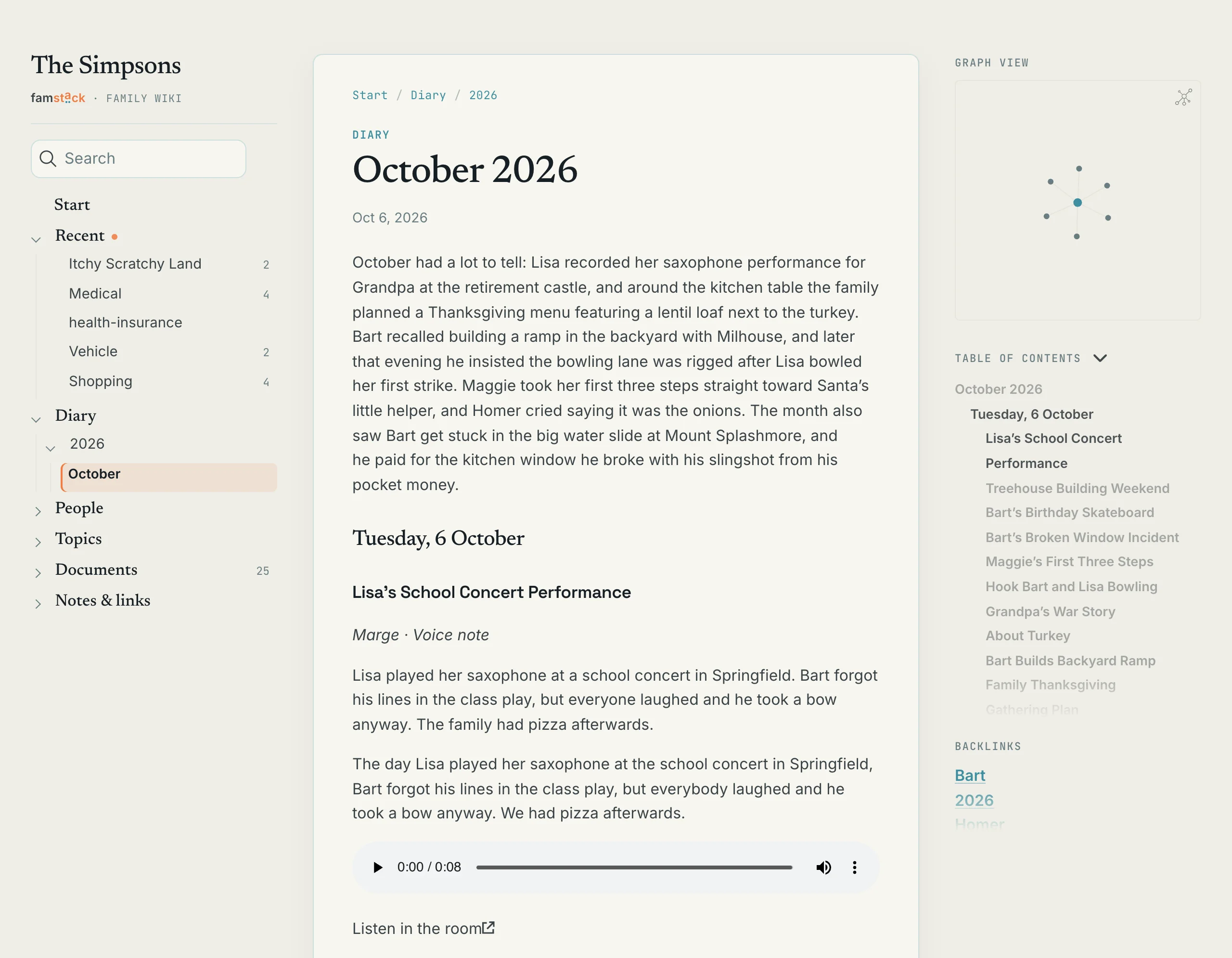
A few things make it work day to day:
- The archivist posts each morning’s cards in the room, so the family sees what was kept: the title, the people, the date and the facts of each memory.
- A reply in a card’s thread corrects it, typed or spoken: a misheard name, a wrong date, who a memory was for. The correction is kept under the name of the person who made it, and the diary never overwrites it.
- Long recordings become a short summary with exact quotes, and the full transcript is folded below it.
- When the room has been quiet for two weeks, the archivist asks for the next memory.
The curator compiles the diary every night. To try it right away, post a voice message or a photo in the memories room, then:
./stack memory diary --dry-run    # print the diary pages, write nothing
./stack memory diary              # write them to the wiki now
The pages show up under Diary in the wiki, and the archivist posts them in the room the next morning. The user guide has the family’s side of the room, with a few habits that help, such as saying the date at the start of a recording.
Everything famstack keeps grows in value over time, the documents too. But the diary is the biggest treasure. Every month adds to it, and in five or ten years it holds the kids’ voices at every age, in their own words. No amount of money buys that back later.
So it stays in your home, in a form that outlives famstack. The cards, transcripts and recordings are plain files on your Mac, and you back them up like any other folder. If famstack is gone one day, the diary is still there, and a more capable local model can compile it again. That is the idea behind all of famstack: your family’s data is never locked in.
#Stacky, the family agent
Today my wife had to call the school and asked Stacky for the phone number. The correct number came back in a couple of seconds, all local. I did not even know when we had filed it. I just photograph and file everything now, and it works.
Groceries, the packing list for the camping trip, a topic’s to-dos and the family calendar are lists in the family memory. Ask Stacky to add, tick or move items: by text, by voice or with a photo of a handwritten list. Or use ./stack memory list in the terminal. The archivist puts the dates from a school letter or an appointment confirmation on the calendar, and a document’s tasks on its topic’s list. The wiki shows what is still open on every topic and person page.
Talking to Stacky also got easier:
- It reads a photo you send with a caption.
- It takes a reply to its question without its name.
- It shows what it is doing while a long answer runs.
- A turn takes 8 to 16 s instead of 12 to 50 s on the demo rig.
Stacky is beta, and the part I am most excited about. It is the main topic of 0.5.
#The family wiki
The home page opens with the family: the household facts at a glance, what happened last month and what is ahead. Person and topic pages are written in the family’s voice, in English or German. The menu follows what the family looks for: Lists, Diary, People, Topics, Documents.
Everyone the family knows can have a page, including a baby or a grandparent without a chat account:
./stack memory person add "Maggie Simpson" --as margeEvery page can show or play the photo, file or recording it came from. The start page, at the top of this post, collects what the documents say about the family, and every line names the documents it came from.
#Answers with their sources
Ask the archivist by name in any room it is in, typed or spoken, and the answer names the documents it read:
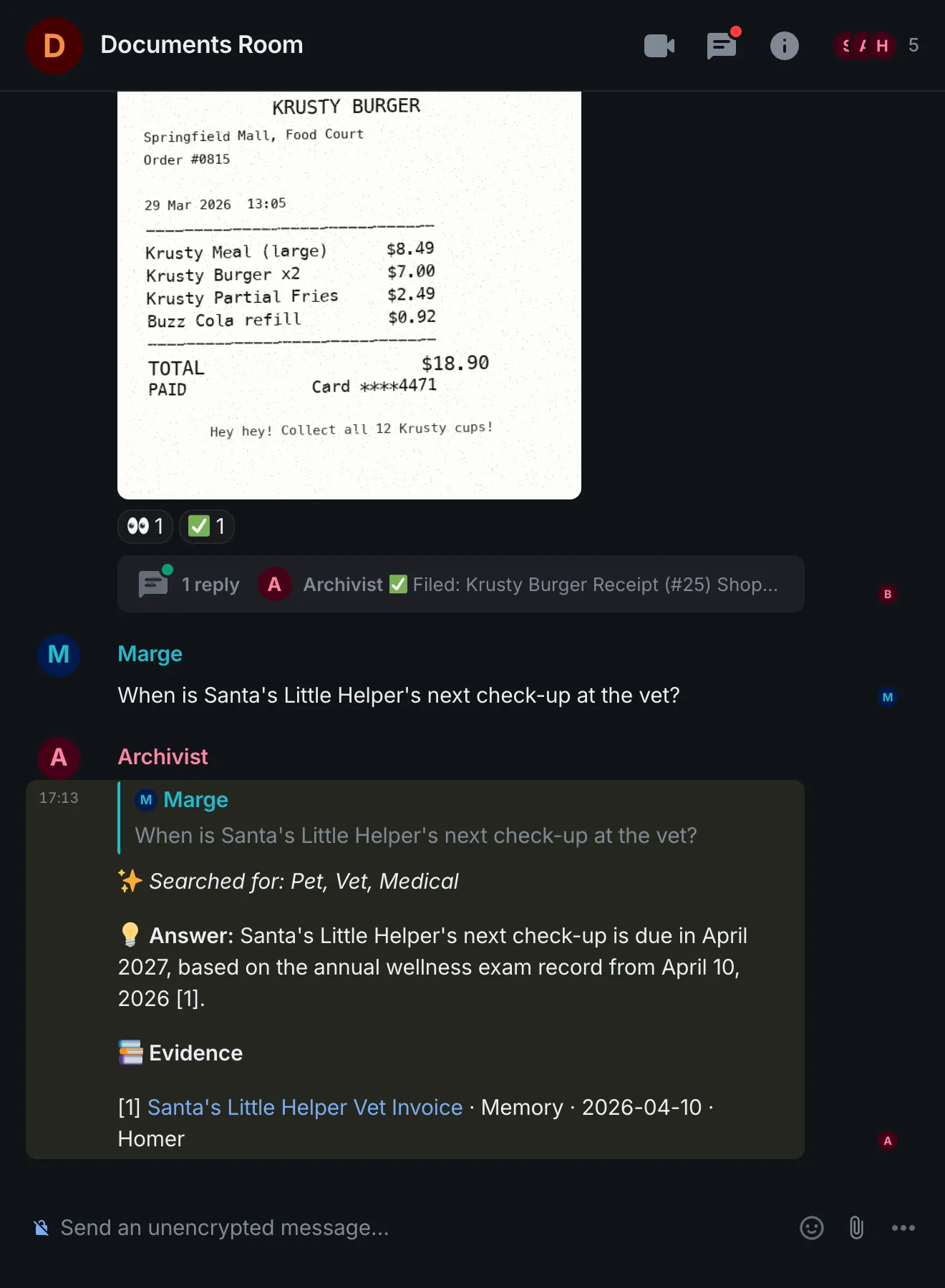
One tap opens the document behind the answer. The archivist writes titles and summaries in the family’s language, also for a document in another language.
The same works from the terminal: ./stack memory ask answers from the family memory. Every search hit links to its wiki page, so Stacky cites what it read.
#Choose where the AI runs
./stack ai switch managed                                   # the engine famstack runs on this Mac
./stack ai switch https://ai.example.home/v1 --key <key>    # a server on another machine
A 16 GB Mac can run everything, but the models it fits are small. In my testing on a 16 GB MacBook with the 9B model, a document took about a minute to file. With ai switch the chat model can run on a bigger machine in the house while speech-to-text and text-to-speech stay on the Mac. An AI app you already run on the same Mac shows up as localhost, not as a remote server.
Voice messages go to the same server, unless you name a speech server of their own. The command checks the server first, and it warns you when the address is outside your home network.
#Talk to the bots, also in encrypted chats
Element X encrypts every direct chat. So before 0.4, a family on Element X could not talk to the archivist or Stacky one to one. The bots now read the encrypted rooms they are invited to, photos, files and voice messages included. Inviting a bot is the family’s choice to have famstack read that room. A chat without a bot stays private.
Voice works like typing now:
- A voice message is transcribed once, and every bot treats it like a typed message. Stacky answers one that starts with its name and quotes what it heard, so a misheard word is easy to spot.
- Whisper knows the family’s names and topics before it listens, so “Bart” no longer comes back as “Part”. And it no longer invents phrases on a silent recording.
- Stacky can answer out loud on the server Mac (
./stack ai say). The voices for the house’s languages, German included, are downloaded on./stack up ai.
#Easier to run
./stack updatemoves to the newest release and names what it changed../stack restartrestarts exactly the stacklets that run outdated code, and./stack listand./stack doctormark them.- A
famstackcommand that works from any directory, and an installer that asks for the family’s language. - Your own domain with HTTPS: every stacklet under its own name, certificates through Hetzner or Cloudflare DNS (the infra stacklet is beta).
#A menu bar app
The Mac that runs famstack often has no screen attached, and I want to know it is fine without opening a terminal. The new menu bar app (beta) shows what needs attention and the command that fixes it, each stacklet with its memory use, the errors of the last day, and how full the disk is. Each stacklet’s menu starts, stops or restarts it, opens it in the browser, or opens its logs in Terminal.
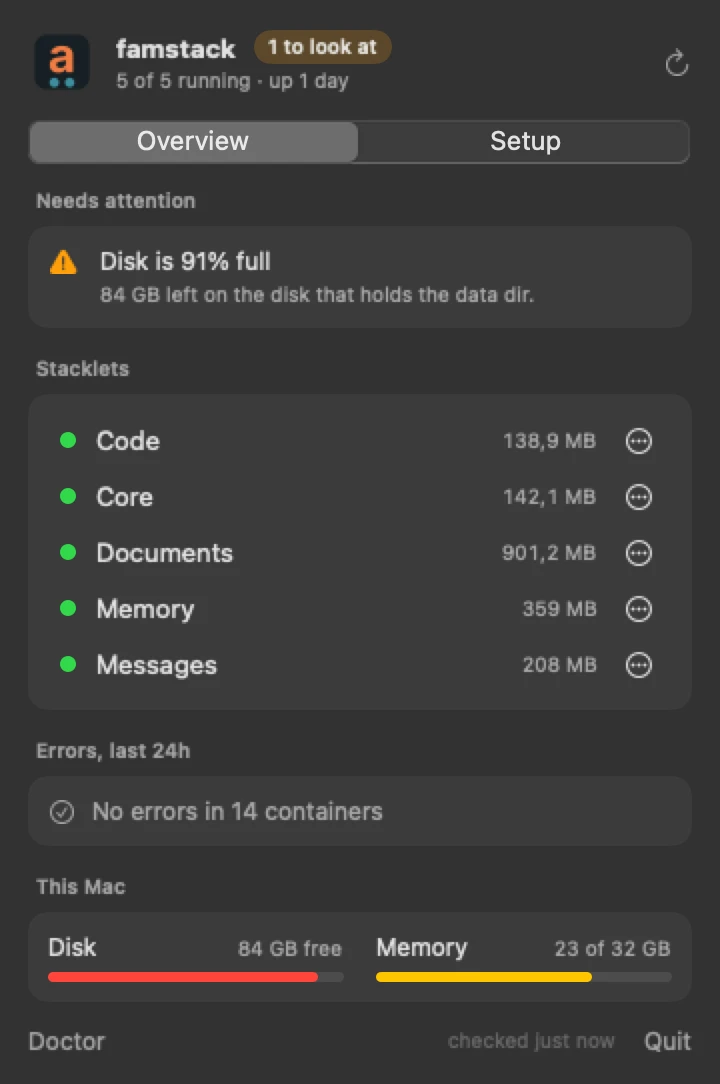
It runs on the server itself or on your laptop, where it reaches the server over SSH. It keeps no state of its own: what it shows and what it does goes through ./stack. ./stack app install builds it from your checkout and puts it in Applications. Run it again after an update.
#Many more improvements
- Refined interaction with the bots. Not perfect yet when several bots share a room.
- The archivist answers when a message starts or ends with its name, and files a room in the language you set with
!config language. - The chat server is backed up: its database, signing key and voice recordings.
- One sign-in for Paperless, Immich and Forgejo, through an OIDC provider stacklet.
- Every container image is pinned to a version.
- Stacky no longer loops endlessly, and it answers in the language the message was written in.
Everything else is in the 0.4.0 release notes.
#Try it
A fresh install:
git clone --branch v0.4.0 https://github.com/famstack-dev/famstack.git
cd famstack
./stack
famstack is most useful when it goes where the family goes: with a family intranet on Tailscale, the chat, the photos and the wiki work on mobile data the same way they work at home.
Already running famstack?
- From 0.4.0-rc.2:
./stack update, then./stack restart. - From 0.4.0-rc.1: the same two commands, then the steps in the rc.2 notes.
- From 0.3.0-beta.3: it has no
./stack updateyet, so this move is by hand, once. Back up~/famstack-dataand the configuration, stop ChatAI if it runs (./stack down chatai), thengit fetch --tags && git checkout v0.4.0and./stack restart all. The release notes have every step. From then on,./stack updatedoes it.
If something breaks, open an issue or come to the Discord. If it works: please share it. A star, a post, a mention. That’s what keeps a project like this alive.
0.5 is about Stacky as the family’s assistant, and an even better family wiki.